We at FM Match Lab think that modding is a vital part of the FM experience.
Therefore we also have a space for other type of modding content that we think can enhance your save. We will feature skins, face packs and other mods that we think can add another element of realism or QoL to your save, besides our mods. All the content that will be featured here has written permission from their authors for us to have their work shown and linked here.
All skins and facepacks being show here are the responsability of their creators and we host them, not as our work, but as a recognition of their excellence.
NG_Regens Newgen Megapack with Women’s Football Pack 2 – FM26, FM24
Hello guys!
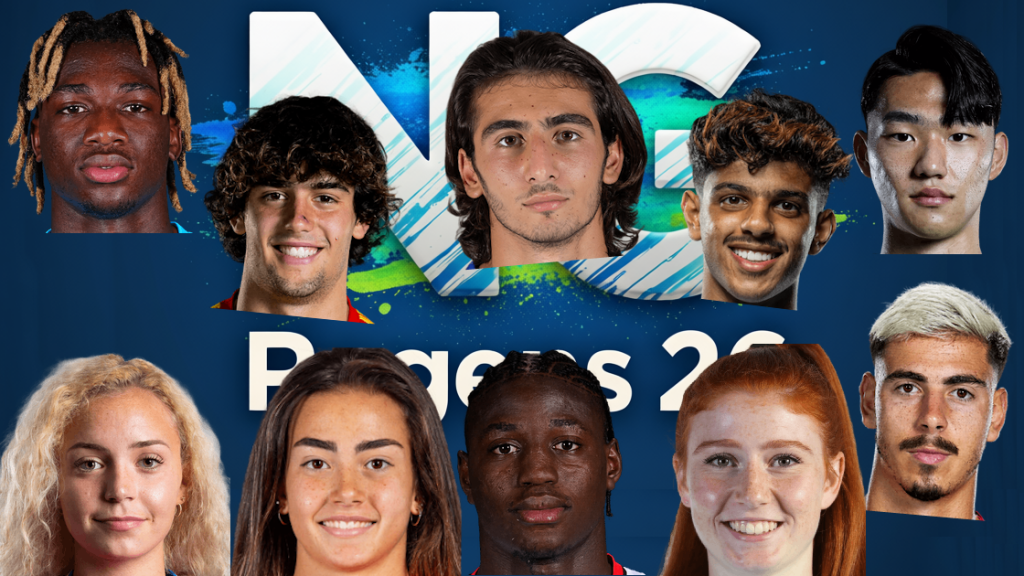
I would like to share with you my newgen replacement pack. The pack currently consists of:
160,000 male player pictures across 60 different ethnicity categories
18000 female player pictures – this base pack is still under development, not every nation/ethnicity is covered yet.
18000 staff pictures for both male and female.
You can have a preview of my pictures and (almost all) ethnicity categories here:
MALE PICTURE SHOWCASE
FEMALE PICTURE SHOWCASE
For FM26, you can get the pack in two versions:
a) Single Bundle File (NG_Regens Lite Experience)
This is a single bundle file that you can place in your FM26 folder. It’s easy to install and use, but it’s significantly limited in what it can do, how many faces it includes, and what methods are used to assign faces to newgens.
b) Full Experience with Custom Software
For Windows (FM26 and FM24) and Mac (FM26 or FM24 with the old shortlist method on the old 25 verison of the software) users I recommend the full experience with my custom software. It supports more than 10 times the number of pictures, categories, and assignment methods. For FM26 I’m currently investigating how to port this to Steam Deck.
Follow the guide here:
FM26/FM24 WINDOWS BETA GUIDE
If you have problems accessing the page that means your provider uses crappy AI modules that have false flagged the page. As a workaround you can set your Windows DNS Settings to use Google DNS 8.8.8.8 or Cloudflare DNS 1.1.1.1. You can find (not mine) guide on how to do that on your Windows machine here
THE BUNDLE REPLACEMENT METHOD:
If you’re on Windows, I strongly recommend using the full experience of the pack with my custom software. However, if your platform isn’t supported yet or you don’t want to deal with the software I’ve created, I have a bundle file for you to use with the bundle replacement method. Just keep in mind that this bundle represents only about 5-10% of the full experience (it’s not me limiting you to force software adoption – this is simply how the bundle method works).
1. Download the updated bundle file from here: https://download.ngregens.org/ui-newgen-portraits_assets_all.bundle
2. Go to your FM26 install directory. By default, it should be \Steam\steamapps\common\Football Manager 26\fm_Data\StreamingAssets\aa\StandaloneWindows64\
3. Make a backup of the ui-newgen-portraits_assets_all.bundle file in case you want to revert to default faces.
4. Copy the file you downloaded in step 1 into the FM26 folder, replacing the original file.
5. Start FM26, go to the Preferences screen, and select “Detailed” in the top menu. Then select “Audio & Visual” in the left menu and check the “Use pre-generated pictures of players (and staff) rather than dynamically-generated images” option (as shown in the screenshot).
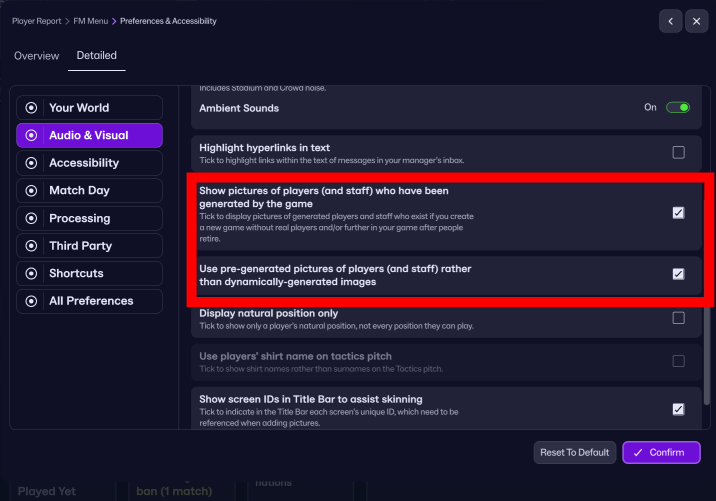
6. Restart the game.
To revert (or migrate to my full-featured experience with the custom software), uncheck the “Use pre-generated pictures of players (and staff) rather than dynamically-generated images” option and copy the original bundle (that you backed up in step 3) back into the FM26 directory.
If you are interested in FM24 version with shortlist export method for both Windows and Mac you can still download and use the old 25 version of the software below.
Stay tuned!
Q: Why did you create a new folder structure? / How can I unpack your pack into the old NewGAN “Italmed/YugoGreek…” folders?
A:
First off, huge shoutout to the original NewGAN team—they did an amazing job, and their work is still being used by thousands of people today. Even my project builds on the filters and views they created, so big respect to them. Seriously, none of this would be possible without their foundation.
That said, the original NewGAN pack came out about five years ago, and it was built using the tools and structure available at the time. It only has 14 categories for the entire world. A lot of care went into the big football nations, but unfortunately, many other countries kind of got lumped together in ways that don’t really make sense.
Due to how diverse the pack is, I had to create my own expanded folder system to accomodate all 55 categories, so the pack requires a custom NG_Regens Manager 25 software
Installation guide:
1 – Get the main NG_Regens facepack here
2 – Copy the NG_Regens folder into your FM Graphics folder. It would be the same folder where you have put the original newgan facepack or where you put real facepacks. In my case that would be “Documents\Sports Interactive\Football Manager 2024\graphics\faces\”
3. Download the NG_Regens Manager 25: Windows | Mac
4. Watch the NG_Regens Manager 25 guide on Youtube
If you need a detailed video guide on shortlist export process you can find it here
Deepdive into new version 1.2 features
I will redo all three current Youtube videos into one, but this is a time consuming process, so bear with me.
If you’ve already got a save going and want to keep your existing regen faces but generate new ones using my latest pack—you’re all good, I’ve got you covered! The program can read both the classic NewGAN format (Zealand’s original one) and the newer FM.Z/URAN format. If anyone’s using a different format, definitely let me know so I can look into it.
Just a heads-up though—this compatibility is one-way:
You can use your old mappings with this tool, but you won’t be able to go back and use classic NewGAN/FM.Z/FMRTE afterwards (or at least, I honestly have no idea what would happen).